
Table of Contents
Project: Send SMS using SmsManager API in Android Studio with Source Code
Objective
This example is using the smsManager API to send out the SMS message.
Output
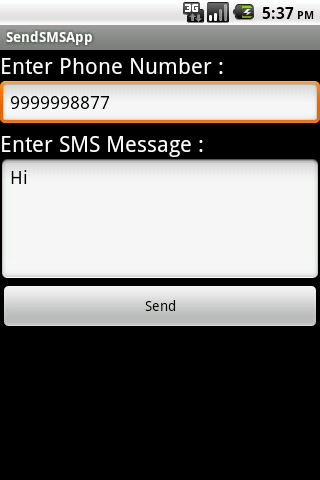
Step 1 Android Layout
Path: res >> layout > main.xml
<?xml version="1.0" encoding="utf-8"?>
<LinearLayout xmlns:android="http://schemas.android.com/apk/res/android"
    android:id="@+id/linearLayout1"
    android:layout_width="fill_parent"
    android:layout_height="fill_parent"
    android:orientation="vertical" >

    <TextView
        android:id="@+id/textViewPhoneNo"
        android:layout_width="wrap_content"
        android:layout_height="wrap_content"
        android:text="Enter Phone Number : "
        android:textAppearance="?android:attr/textAppearanceLarge" />

    <EditText
        android:id="@+id/editTextPhoneNo"
        android:layout_width="fill_parent"
        android:layout_height="wrap_content"
        android:phoneNumber="true" >
    </EditText>

    <TextView
        android:id="@+id/textViewSMS"
        android:layout_width="wrap_content"
        android:layout_height="wrap_content"
        android:text="Enter SMS Message : "
        android:textAppearance="?android:attr/textAppearanceLarge" />

    <EditText
        android:id="@+id/editTextSMS"
        android:layout_width="fill_parent"
        android:layout_height="wrap_content"
        android:inputType="textMultiLine"
        android:lines="5"
        android:gravity="top" />

    <Button
        android:id="@+id/buttonSend"
        android:layout_width="fill_parent"
        android:layout_height="wrap_content"
        android:text="Send" />

</LinearLayout>
Step 2 SendSMSActivity.java
SendSMSActivity.java Activity to send SMS via smsManager.
public class SendSMSActivity extends Activity {

Button buttonSend;
EditText textPhoneNo;
EditText textSMS;

@Override
public void onCreate(Bundle savedInstanceState) {
super.onCreate(savedInstanceState);
setContentView(R.layout.main);

buttonSend = (Button) findViewById(R.id.buttonSend);
textPhoneNo = (EditText) findViewById(R.id.editTextPhoneNo);
textSMS = (EditText) findViewById(R.id.editTextSMS);

buttonSend.setOnClickListener(new OnClickListener() {

@Override
public void onClick(View v) {

String phoneNo = textPhoneNo.getText().toString();
String sms = textSMS.getText().toString();

try {
SmsManager smsManager = SmsManager.getDefault();
smsManager.sendTextMessage(phoneNo, null, sms, null, null);
Toast.makeText(getApplicationContext(), "SMS Sent!",
Toast.LENGTH_LONG).show();
} catch (Exception e) {
Toast.makeText(getApplicationContext(),
"SMS faild, please try again later!",
Toast.LENGTH_LONG).show();
e.printStackTrace();
}

}
});

}
}
To know more about SMSManager please refer:
Step 3 Add Permission into Manifest file.
<uses-permission android:name="android.permission.SEND_SMS" />
I hope you enjoy this tutorial and it would be helpful to you.
Download Here


